Wednesday, August 27

Seagate 8 Tb HDD

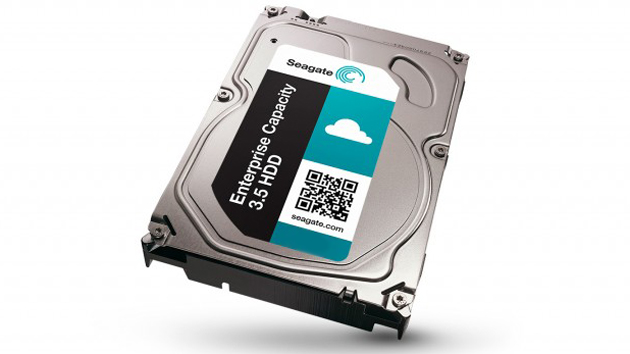
Seagate has started to deliver the first ever 8Tb desktop hard drive. These drivers come in the standard 3.5" form factor, but this drivers not go inside to your gaming PC. Right now these devices are destined for data centers where capacity is very concern. Still Seagate does not announce the price of this device but hopefully price will be cheap.


Sample Pic

Tuesday, August 26

The difference between IP4 and IP6 Addressing


The most obvious difference between the two protocols is the length of their source and destination addresses. The whole point of making the switch to IPv6 is to compensate for a global shortage of IP addresses. It only makes sense that the IPv6 protocol has a larger address space than the IPv4 protocol does.

The IPv4 protocol uses a 32-bit source and destination address. These addresses are typically represented as a series of four octets. As I’m sure you know, a typical IPv4 address looks something like this: 192.168.0.1.

In contrast, an IPv6 address is 128 bits in length. This allows for a total of 3.4×1038 (or 340,000,000,000,000,000,000,000,000,000,000,000,000) addresses. There are several different ways of representing an IPv6 address. An IPv6 address is normally written as eight groups of four hexadecimal digits, each separated by colons. For example, an IPv6 address looks like this: 2001:0f68:0000:0000:0000:0000:1986:69af

Monday, August 25

Disable the highlight border on an html input elements (Google Chrome)

Have you ever face to this issue when you develop HTML applications? I think most of the time answer will be "Yes". But don't worry today I am going to teach you how to get-rid-of this Issue.


 Let's see the solution, its pretty easy who know the CSS but for the beginners this will help.

    input[type=text]:focus, select:focus, Textarea:focus
    {
outline: 0;  /*this is how we do that ;) */
    }

if you want to disable only for a few element on your page, you can do it using pseudo class

    input[type=text].yourcssclassname:focus
    {
outline: 0; /*this is how we do that :D */
    }


Tuesday, August 12

Reset HTML Form

I hope this will know some readers but today I am going to teach who don't know about this.

Actually someone can say we can simply use HTML reset button and no need to talk anymore, "Yes you are correct" And at the same time, a huge, resounding "No you are wrong" because when we use reset button it reset to default only the visible form elements so how about hidden fields.


So without further gilding this is how we can do it.


function fn_clearform(){
     var frm_elements = document.yourformname.elements;
     document.yourformname.reset();
     for (i = 0; i < frm_elements.length; i++)
    {
        field_type = frm_elements[i].type.toLowerCase();
        switch (field_type)
        {
            case "hidden":
            frm_elements[i].value = "";
               break;
            default:
               break;
        }
     } 
}


Monday, August 11

If anybody want to know about Storing and Retrieving Images from SQL Server Using Strored Procedures and C#.net Please go to my Article in the codeproject 

below is the link to that article  
Storing and Retrieving Images


Thursday, August 7

Are you wanted to browse fast in windows?


Are You Wanted to Browse fast in windows, Then Remember these commands. This will really save a lot of time of your. There are many Commands which you might have never seen or never knew.


Windows Run Commands

1. Add Hardware Wizard = hdwwiz.cpl
2. Add/Remove Programs = appwiz.cpl
3. Character Map = charmap
4. Clipboard Viewer = clipbrd
5. Computer Management = compmgmt.msc
6. Folders Properties = control folders
7. Fonts = control fonts
8. Keyboard Properties = control keyboard
9. Mouse Properties = control mouse
10. Java Control Panel (If Installed) = javaws


Thursday, June 21

Coming Soon


Dear readers today I started to learn AJAX and jQuery. So far I feel those stuff are very cool and useful to my web development knowledge. When I search for learning material I got stuck several time, so I decided to write some posts after I got learn this stuff. When I write posts I will try to explain coding simple manner. until then you can read basic from w3schools.  


Basic Idea About These Stuff  


AJAX Logo
 AJAX : This is a technology, that involves send/retrieve data asynchronously from a web application to Web-server. Advantage of this technology is we can reload fragment of a webpage. 


jQuery Logo

jQuery : This is a javascript framework that makes working with the DOM easier by building lots of high level functionality that can be used to search and interact with the DOM. Advantage of this framework is we can do Big things by writing small portion of codes. 
 

Wednesday, June 20

Microsoft Visual Studio Tips and Tricks

Accessing a Line of Code by its Index


Sometime when we working on large scale projects, we need to go through document that has many lines of code and we need to jump hear and there in that document. This type of situation, Code Editor of Microsoft Visual Studio give a solution for you. We call it as "jumping tool". There are two ways to open this tool, 

Figure-I
  • On the main menu, click Edit -> Go To...
  • Press Ctrl + G
This would display a dialog box mention in Figure-I. Enter the line number you want to jump and click OK or press Enter.

Microsoft Visual Studio Tips and Tricks

Sometime this tip will be new to you so try it today, it will help you to develop application rapidly.

Preserve Piece of Code in Microsoft Visual Studio 

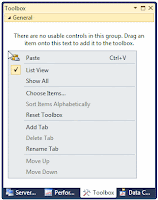
This means that, if you have code you want to use in different sections, you can preserve it somewhere to access it whenever necessary. To save code to use over and over again, first type the code in any text editor, whether in Notepad, Microsoft Word, or the Code Editor of Microsoft Visual Studio. You can use code from any document where text can be copied, including a web page. Select that code and copy it to the clipboard. To preserve it, in Microsoft Visual Studio, display the Toolbox (on the main menu, you can click View -> Toolbox). Right-click an empty area on the Toolbox and click Paste.

In the same way, you can add different code items to the Toolbox. After pasting or adding the code to the Toolbox, it becomes available. To use that code, drag it from the Toolbox and drop it in the section of the Code Editor where you want to use it.
Before Past Code
Before Past Code
After Paste Code
After Paste Code
After preserve code in visual studio toolbox you can rename,delete or copy again by right-click on the piece of code.

C# Nullable Types

When you declare a variable, you ask the compiler to reserve a certain area and amount of memory to eventually hold a value for that variable. At that time, no clear value is stored in that reserved area of memory. Instead, the area gets filled with garbage, which value is referred to as null when it cannot be clearly determined. A null value is not 0 because 0 is an actual value.

 In C#, normally, not all variables can hold null values. But if you want to do so you can do it.

There is a tow way of declaring Nullable variables, in here I will mention both ways.   
  

System.Nullable<T> variableName
-Or-
T? variableName 

T is the underlying type of the Nullable type. T can be any value type including struct. It cannot be a reference type.

E.g.:  int? i = null;
  
When you create a Nullable of Int32, it can be assigned any value from -2147483648 to 2147483647 or it can be assigned the null value. 

The Nullable type modifier enables C# to create value-type variables that indicate an undefined value.