 Sometime this tip will be new to you so try it today, it will help you to develop application rapidly.
Preserve Piece of Code in Microsoft Visual Studio
This means that, if you have code you want to use in different sections, you can preserve it somewhere to access it whenever necessary. To save code to use over and over again, first type the code in any text editor, whether in Notepad, Microsoft Word, or the Code Editor of Microsoft Visual Studio. You can use code from any document where text can be copied, including a web page. Select that code and copy it to the clipboard. To preserve it, in Microsoft Visual Studio, display the Toolbox (on the main menu, you can click View -> Toolbox). Right-click an empty area on the Toolbox and click Paste.
In the same way, you can add different code items to the Toolbox. After pasting or adding the code to the Toolbox, it becomes available. To use that code, drag it from the Toolbox and drop it in the section of the Code Editor where you want to use it.
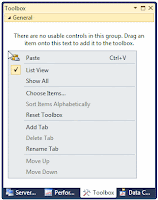 |
| Before Past Code |
 |
| After Paste Code |
After preserve code in visual studio toolbox you can rename,delete or copy again by right-click on the piece of code.
 Sometime when we working on large scale projects, we need to go through document that has many lines of code and we need to jump hear and there in that document. This type of situation, Code Editor of Microsoft Visual Studio give a solution for you. We call it as "jumping tool". There are two ways to open this tool,


